


Setting Up the gut beraten Interface for IDD
To comply with the IDD (Insurance Distribution Directive), individuals in insurance distribution (agents, brokers, and employees with customer contact) must complete at least 15 hours of further training annually. In Germany, documentation and proof can be provided via the gut beraten initiative. If a customer wishes to collaborate with gut beraten, the documentation of IDD time can be done via the interface. Learn here which settings are required for the interface and how to proceed.
1
Obtain the following data from gut beraten:
- Certificate for the live system (and test system if available)
- Endpoint for the live system (and test system if available)
- Username/Alias
- Password
2
As an Author, navigate in the backend to the system settings and open the wizard for system settings for insuranceDistributionDirective. Enter the received data there.
3
Part of the configuration of the gut beraten Interface is an X.509 Certificate, which enables signing for secure data transfer to the gut beraten server. Store the Certificate in Avendoo by navigating to PKCS#12 Certificates under Administration and clicking Create. Finally, complete the configuration information in the System settings.
Note: The Certificate must be renewed annually. It is best to add this to your calendar today. The certificate can be renewed 30 Days before expiration of validity.
4
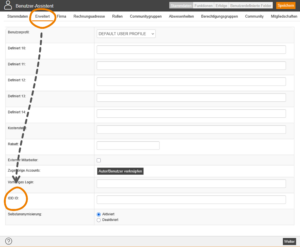
Now, store the IDD-ID for each User account under the Extended tab. This can also be done via data import.
5
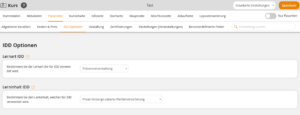
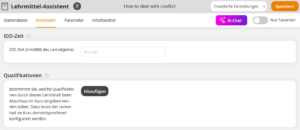
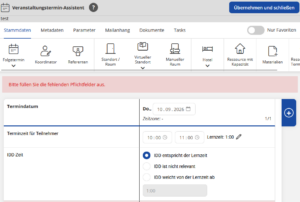
Assign the IDD options and the IDD time for the selected courses and learning objects.
6
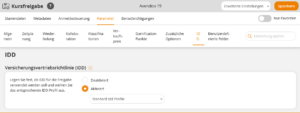
Activate IDD on the Course activation under Parameters and select the corresponding IDD Profile.
7
Contact your Avendoo Contact partner. They will check the settings made and finalize the setup of the interface to gut beraten.
Prereqisites
Author Account with Permissions
- System settings: Change, Create
- PKCS# Certificates: Change, Create
- User: Change, Create
- Course activations: Change, Create
- Courses: Change, Create
- Events: Change, Create