


Compare Qualifications in the Cockpit with Other Qualifications Profiles
As a team leader, you can compare the qualifications of one employee with other qualifications profiles. This allows you to see at a glance whether the employee already has the qualifications required for a position. You can select any qualifications profile belonging to the client for comparison. To compare all employees with the same qualifications profile, use the Qualification matrix.
1
In the Cockpit, go to the Qualifications area.
2
Click on the User Name of the desired employee. The Employee View opens. It is indicated by an overlay in the lower center of the window.
3
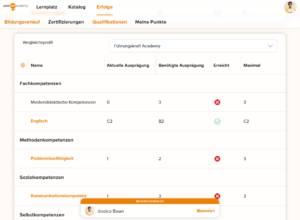
In the employee view, go to the Achievements→ Qualifications tab. Here you can see the person’s qualifications. Scroll to the Comparison profile section.
4
Here you can show different comparison profiles and see at a glance whether the employee meets the qualifications required by the profile. Select the comparison profiles from a dropdown. They are displayed in alphabetical order and can also be searched. All qualifications profiles belonging to the client are shown.
Prerequisites
Team leader account with the permissions
- Qualifications in the cockpit
- View training inventory entries
Was this article helpful?
Thank you for your feedback!