


Move Several Participants (Alternative Date)
With this function you can register several participants for an alternative date. An alternative date is a further date or an event date group in the same event.
1
Go to Event management → Overview of event date or Overview by event date group and click the Event title to open the Event Manager for a date.
2
On the Overview tab, select the option Move Several Participants (Alternative Date).
3
A dialog window opens showing all available future alternative dates. Initiated event dates are also displayed here. Select an alternative date and click Select.
4
The list of participants for the current event date is displayed. Select all participants you wish to move to the alternative date and click Next.
5
The participants are moved, and a confirmation of the process along with a list of the re-registered users is displayed. Finally, click On event manager to return to event management.
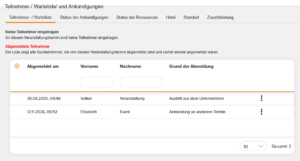
The re-registered users are shown in the list of deregistered participants for the original date with the Reason for deregistration: Registered for other event date.
Prerequisites
Author account with access to an activation client and the following author rights:
- Access to the event manager
- All or Own Event Dates: Show event dates
- All or Own Event Dates: Do deregistrations and registrations
- User: Select