


Send Notification to Course Participants
If you want to quickly and specifically inform course participants about important information, you can send a notification directly to the participants of a course in Avendoo. This allows you to communicate organizational notes to participants of an e-learning item or blended learning item, for example. This guide describes step by step how to define the recipients, select a notification template, customize it, and send it.
1
Go to Course management → Course activations and open the context menu via the three-dot icon or by right-clicking.
2
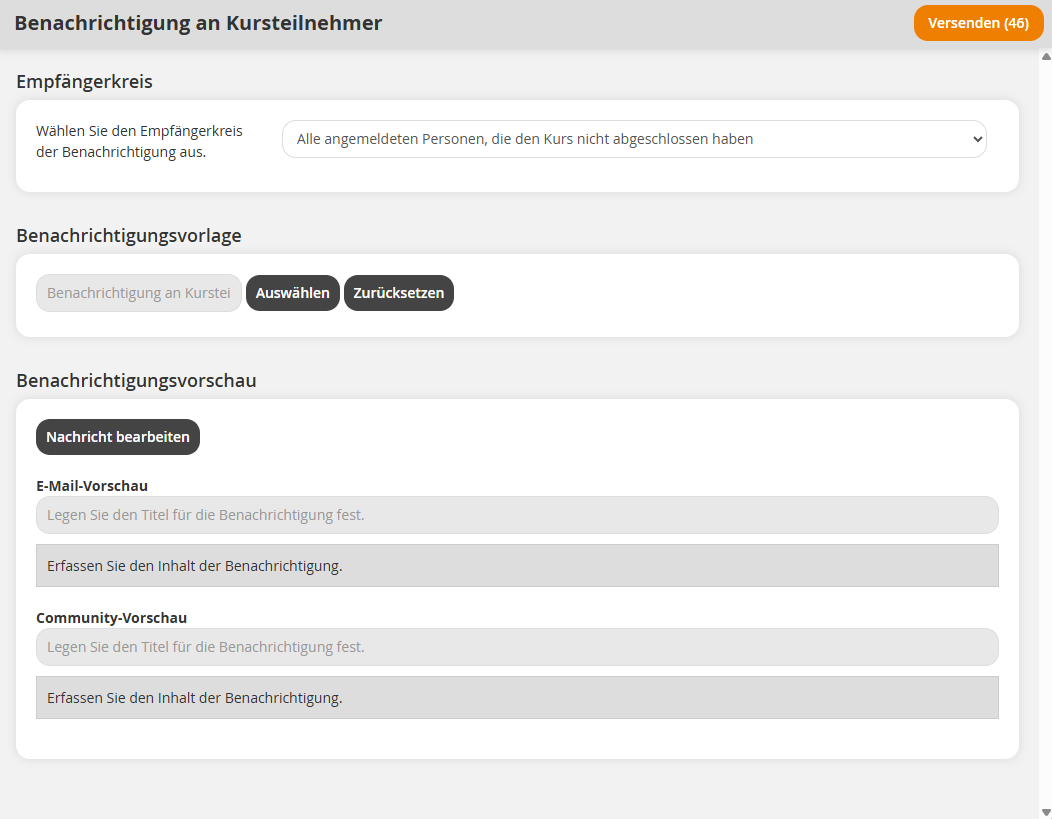
Select the option Notification to course participants. A new window will then open with further settings.
3
Define the recipients for the notification. The following options are available:
- All persons registered who have never opened the course
- All persons registered
- All persons registered who have not completed the course
- All persons registered who have not completed a specific learning object
- All persons with registration status “Catalog” or “Registered” who have never opened the course.
- Individual recipient selection
4
Select a notification template by clicking the Select button.
All individual notifications of the notification type “Notification to course participants” are available for selection. By default, the notification configured for the client in which the course activation is located is selected.
5
Review the notification in the Notification preview section. If necessary, you can make adjustments by clicking Edit message.
6
Click Send to send the notification. The button displays in parentheses the number of persons who will receive the notification.
All sent notifications can be viewed in the Participant management of the course activation (Course management → Course activation → Participant management ). For event participants, Avendoo additionally offers extensive notification options in Events.
Requirements
Author account with the permissions Course activations: Manage participants and Individual notifications: Select