


Delete Participant Rule
A participant rule can also be deleted. This does not affect manually registered users. In addition, the results of already completed content are not lost and remain accessible via the learning history and reporting. If users who were enrolled by a participant rule are to be unenrolled, you can set the enrollment status in the participant rule to No Access.
Learn how to delete a participant rule here:
1
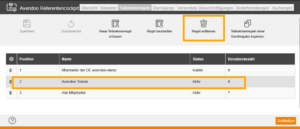
To delete a participant rule, click on the desired participant rule in the list of participant rules and then on the Delete rules option.
2
Clicking Save will activate the removal of the rule. Deleting the rule has no effect on users who were enrolled by the participant rule or activated in the catalog.
Was this article helpful?
Thank you for your feedback!