


Set up Custom AI Services in the AI Package
Custom services can be set up in the AI Package for some AI functions in Avendoo (e.g., Automatic Translation and AI Chat in the Instructional material wizard). This guide explains how to proceed with the Configuration.
1
Go to Administration → Add-ons and click Configure in the row of the AI Package Addons.
2
The Configuration window for the AI Package opens. Click the settings wheel of the Avendoo function for which you want to set up a custom AI service (e.g., Translation or Chatbot).
3
Click the Plus symbol to add a new Configuration.
4
Enter a Service Title and select the Access Type (e.g., Large Language Model or DeepL Access).
Under API-URL , enter the URL of your AI service. Then, specify the Authentication Type (e.g., API key, Bearer token, Basic Encryption) and provide the associated access data.
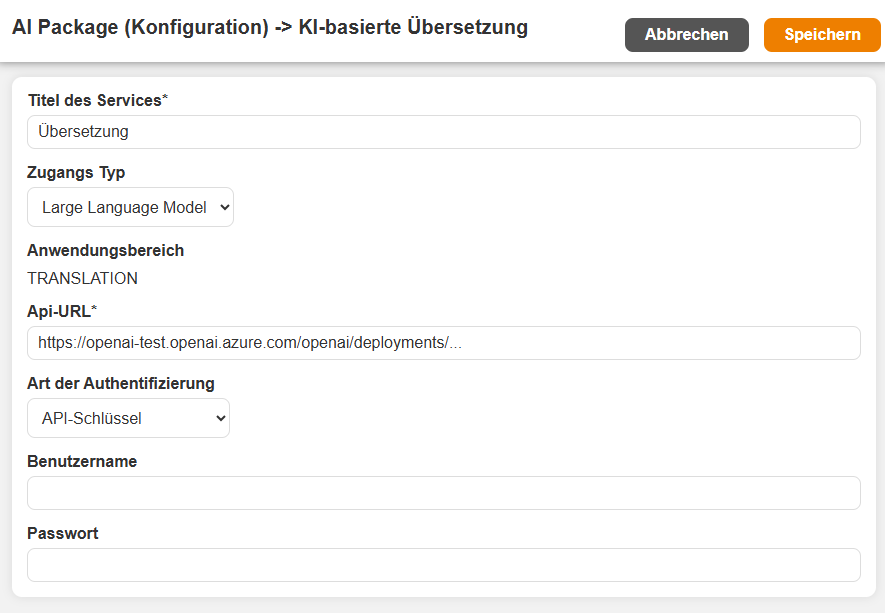
If you do not know the access data for the service used, please ask your IT Administrator.
6
Save.
Prerequisite
Author account with the permission Administration (objects): Change, create Add-ons.