


Generate AI image
If you want to create custom images for your learning content, you can use AI image generation. This step-by-step guide shows you how to proceed.
1
Navigate to Learning content → Media and click the Generate AI image button. A dialog window will open.
2
Select the desired format and quality for the image. Quality does not refer to the image resolution, but rather to how detailed it should be rendered. Enter a description of the image as precisely as possible in the text field.
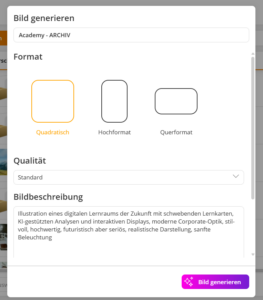
Click Generate image and the image will be created based on your description.
3
Enter a title for the image and click Save image. The image will then be saved in the media library of the selected category.
Tip: The more detailed the image description, the better the AI can produce the desired result. Information about style, atmosphere, colors, or perspective helps create more suitable images.
Prerequisites:
You have installed and configured the AI package