


Generate instructional material
With AI instructional material generation, you can have new instructional material created automatically from available materials. This step-by-step guide shows you how to proceed.
1
Navigate to Learning content → Instructional material and click Generate. A dialog window opens.
2
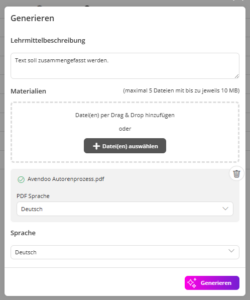
Under Instructional material description, enter a prompt describing how the instructional material should be structured. For example, you can specify that content should be presented more compactly or phrased in a specific style.
Under Materials, add a PDF file from which the instructional material is to be created.
Under Language, select the language in which the instructional material is to be created. The content of the PDF can be translated directly.
Click Generate. The AI then automatically creates a suggestion for your instructional material.
3
Assign a title to the instructional material. Using the Show preview button, you can view the instructional material before saving.
4
Save the instructional material.
Prerequisites:
You have installed and set up the AI package.