


Conditions for Texts in Notifications
With the help of conditions, Authors can flexibly adapt the texts in notifications to different requirements. For example, in an event notification, different text blocks can be shown depending on whether an on-site location or a virtual location is used. Likewise, hotel information in a Confirmation of registration or E-mail invitation can be displayed only if a participant has additionally booked a hotel.
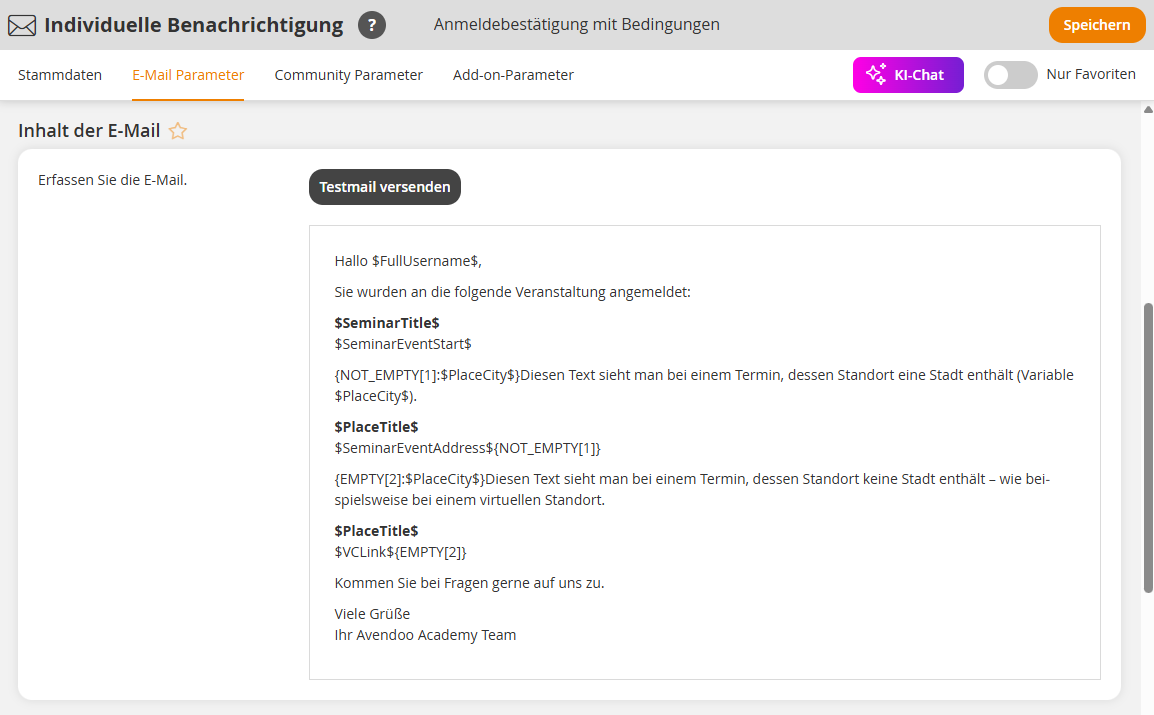
1
Log in as an Author and go to Resources → Notifications or Individual notifications.
2
Started an available Notification and insert conditions.
With the conditions NOT_EMPTY and EMPTY, content can be shown depending on whether a variable contains a value or is empty.
NOT_EMPTY
The content between the two NOT_EMPTY elements is shown only if the variable contains a value.
{NOT_EMPTY[1]:$PlaceCity$}

...

{NOT_EMPTY[1]}
This is the case, for example, for on-site dates with a location for which a city (variable $PlaceCity$) is stored.
EMPTY
The content between the two EMPTY elements is shown only if the variable is empty.
{EMPTY[2]:$PlaceCity$}

...

{EMPTY[2]}
This can occur, for example, for VC dates (Virtual classroom) where no town or city (variable $PlaceCity$) is stored.
The number in square brackets is used to identify related condition blocks. When a condition is opened, a consecutive number is assigned automatically. The same number is used when closing the condition.
Conditions can be nested. The closing order of the conditions must match the opening order. The last condition opened must be closed first.
Example: Confirmation of registration
Hi $FullUsername$,
You have been registered for the following event:
$SeminarTitle$
$SeminarEventStart$
{NOT_EMPTY[1]:$PlaceCity$}
This text is shown for a date whose location includes a city.
$PlaceTitle$
$SeminarEventAddress$
{NOT_EMPTY[2]:$BookedHotel$}
This text is shown for a hotel booked by the participant for the event. In addition, the Precondition must be met.
{NOT_EMPTY[2]}
{NOT_EMPTY[1]}
{EMPTY[3]:$PlaceCity$}
This text is shown for a date whose location does not include a city—for example, for a virtual location.
$PlaceTitle$
$VCLink$
{EMPTY[3]}
3
Save the notification and embed it in an event or a client.
Requirements
Author account with the Permissions Notifications: Change, create or Individual notifications: Change, create