


Inserting variables into a certificate
Variables allow content in certificates to be automatically populated with the data of the respective participant or course. This makes it possible, for example, to output the name, course title, date completed, or certificate number dynamically in a certification without having to edit each certificate manually.
1
Navigate to Resources → Certificates and edit an existing certificate or create a new certificate. The Certificate wizard opens.
2
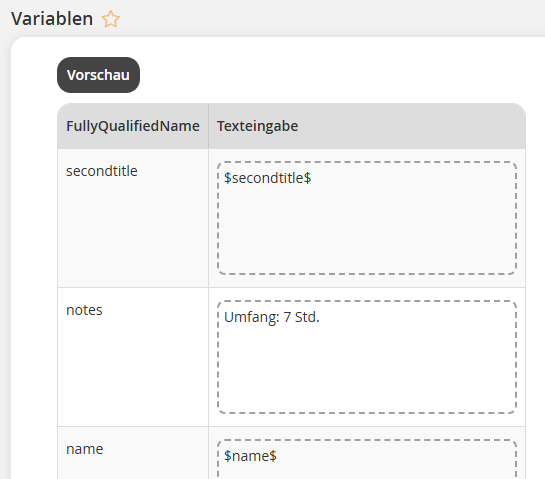
Go to Certificate template and, under Medium, select a template from the media. The form fields from the selected certificate template are displayed in a table in the Variables section.
3
In the Text input column, enter a Text or insert a Variable by clicking the variable icon $.
Variables for certificates
You can use the following variables in certificates. Please note that variables for events and dates are only output if the certificate is integrated for the event in the Course wizard under Course contents. Variables for evaluations are only output if the certificate is integrated in an evaluation.
| Variable | Meaning |
|---|---|
| $address$ | Inserts the address of the certified user. |
| $allReferents$ | Inserts all speakers of an event. |
| $assessmentRatedByUserDefined10$ | Inserts the entries from the Defined 10–14 fields from the user data of the assessing user, i.e. the user who filled out the evaluation. |
| $assessmentRatedByUserDefined11$ | |
| $assessmentRatedByUserDefined12$ | |
| $assessmentRatedByUserDefined13$ | |
| $assessmentRatedByUserDefined14$ | |
| $assessmentRatedByUserFirstName$ | Inserts the first name of the user who filled out the evaluation. |
| $assessmentRatedByUserFullName$ | Inserts the full name of the user who filled out the evaluation. |
| $assessmentRatedByUserLastName$ | Inserts the last name of the user who filled out the evaluation. |
| $assessmentRatedByUserSecondTitle$ | Inserts the title of the user who filled out the evaluation. |
| $assessmentRatedByUserTitle$ | Inserts the form of address used with the user who filled out the evaluation. |
| $assessmentRatedByUserUserName$ | Inserts the user name of the user who filled out the evaluation. |
| $assignmentAssignDate$ | Inserts the date on which the user was registered for the course activation.
Requirement: The certificate is integrated as a Course certificate |
| $BulletPointCourseTarget$ | Inserts a bullet-point list for the text of the course goal (see the “Parameters” tab in the Course wizard) into the PDF form. Start the first course goal with a dash. For the text of the course goals, please note that you must add a space after the dash. You can then enter the text, which will be displayed in the certificate with bullets. For another course goal, insert a paragraph and start the new course goal with a dash. There can be an unlimited number of bullet points as long as the height of the form field is not exceeded. |
| $certificatetitle$ | Inserts the Title of the certificate. |
| $city$ | Inserts the city of the certified user. |
| $company$ | Inserts the company name of the certified user. |
| $country$ | Inserts the country of the certified user. |
| $CourseDuration$ | Inserts the course duration of the certified user. |
| $courseobjectduration$ | Inserts the expected task duration of the learning object (setting on the Learning path) |
| $courseobjectlist$ | Inserts the course contents (see section “Certificate content list”). Note: Please note that you must set the checkmark for the Certificate content list for each learning content in the course. |
| $CourseTeaser$ | Inserts the course teaser of the certified user. |
| $coursetitle$ | Title of the course activation in which the certification was issued |
| $customWizardField(type=…)[…]$ | User-defined fields, for example from the date customWizardField(type=event), can be used. |
| $enddate$ | Date on which the certification expires |
| $eventlocation$ | Inserts the location of the date |
| $eventprice$ | Inserts the price of the date |
| $field10$ | Inserts a defined field of the certified user. |
| $field11$ | Inserts a defined field of the certified user. |
| $field12$ | Inserts a defined field of the certified user. |
| $field13$ | Inserts a defined field of the certified user. |
| $field14$ | Inserts a defined field of the certified user. |
| $grade$ | Inserts the participant’s grade from the evaluation. |
| $idddecimaltime$ | Inserts the IDD learning time as a decimal number. |
| $iddTime$ | Inserts the IDD time in hours. |
| $iddtimeminutes$ | Inserts the IDD learning time in minutes. |
| $name$ | User’s first name and User’s last name of the certified user |
| $oe$ | Inserts the organizational unit of the certified user. |
| $participantlocation$ | Inserts the place of residence of the certified user |
| $personnelnumber$ | Inserts the personnel number of the certified user. |
| $points$ | Inserts the number of points earned from the evaluation. |
| $referentsecondtitle$ | Inserts the form of address for speaker. |
| $referenttitle$ | Inserts the form of address for speaker. |
| $secondtitle$ | Additional form of address such as Dr. or Prof. |
| $seminarcoach$ | Speaker of the event for which the certificate was awarded |
| $seminarend$ | End date for the event and end (time) of the event for which the certificate was awarded |
| $seminarenddate$ | End date for the event for which the certificate was awarded |
| $seminarstart$ | Start date for the event and beginning (time) of the event for which the certificate was awarded |
| $serialnumber$ | Adds a sequential number from the corresponding number range of the resource |
| $seminarstartdate$ | Start date for the event for which the certificate was awarded. |
| $sequenceGrade$ | the grade the participant received |
| $sequencePointsMax$ | the maximum number of points that can be achieved in the knowledge test |
| $sequencePointsPercentage$ | the calculated percentage the participant achieved |
| $sequencePointsReached$ | the number of points the participant achieved |
| $startdate$ | Date from which the certification is valid. This is the point in time at which the certification is issued/achieved, with one exception: If the certificate is linked to an event in the learning path, then the end of the event date group is used as “startdate” for which successful participation was last confirmed. This ensures that the validity period is not unnecessarily extended by later recording attendance. Validity (=startdate) therefore begins at the end of the event date (=event attended), regardless of when attendance is recorded. |
| $UserFirstname$ | User’s first name of the certified user |
| $title$ | Form of address used with user of the certified user |
| $UserLastname$ | User’s last name of the certified user |
| $UserUsername$ | User name of the certified user |
| $zipcode$ | Inserts the ZIP code of the certified user. |
4
Check your entries by clicking the Preview button and make adjustments if necessary.
5
Save the certificate and integrate it into the course in the next step.
Prereqisites
- Author account with the Certificates: Change, create permission
- Created and uploaded Certificate template with form fields