


Evaluate Qualifications Profiles in the Matrix
As a team leader, you can use the qualification matrix to compare all employees who have the same qualification profile. This allows you to see at a glance whether and to what extent the requirements are met. To compare an individual employee’s qualifications with several qualification profiles, use the employee view. Learn how to open and use the qualification matrix here.
1
In the Cockpit, go to the Qualifications area.
2
Click the Show filter button and select a qualification profile in the filter settings to use for the comparison. Optionally, you can also narrow the selection to specific qualifications or qualification groups.
3
Above the list of your employees, click Open matrix. The qualification matrix opens.
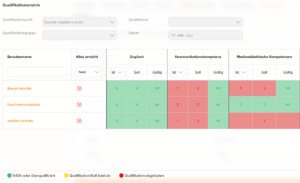
You can see all employees assigned to the selected qualification profile. The color coding shows the extent to which the profile requirements are met. Expiring qualifications are also indicated.
Numerical Values in Table Cells
The cells display the numerical equivalent of the qualification scale used.
Example: The language proficiency scale is structured as follows:
1-A1
2-A2
3-B1
4-B2
5-C1
6-C2
If the user has achieved level C2, the numerical value 6 is displayed.
Actual and Target
In these columns, the target value shows the scale value defined for the selected qualification profile. The actual value shows the qualification level currently achieved by the respective user.
The table cells are also color-coded: Bothare greenif the target value has been achievedor exceeded. Both fields are red if the target value has not yet been achieved.
Valid
The Valid column shows whether the qualification is valid indefinitely (∞) or has an expiration date. If it has an expiration date, the date is displayed.
This column also uses a color key:
● green – valid or valid indefinitely
● yellow – qualification expires soon
● red – qualification expired
Prerequisites
Team leader account with the permissions
- Qualifications in the cockpit
- View training inventory entries
The matrix is only visible if the qualification profile filter has been set first.