


Event Schedule in the Event Manager
In the event manager, the event schedule for a date is displayed visually. You can see key information about your event date at a glance. Learn here what is shown in the respective sections.
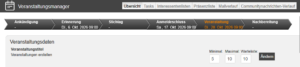
Announcement
Reminder
Deadline
End of Registration
Event
Follow-up
Shows the date on which an announcement email was sent to all course participants. An announcement is sent to all persons who are not yet registered for a date of this event. This allows event dates to be promoted in particular.
Shows the date on which a reminder was sent to all course participants to complete preparation tasks, provided this was set up in the event wizard.
The deadline indicates the date by which all preparation tasks must be completed. If the deadline is defined, participants who have not completed the preparation tasks will have their registration canceled on that date.
Shows the date from which registration is/was no longer possible, provided it was set in the event wizard.
Shows the date of the event.
Indicates the date on which the follow-up email was sent.
Prerequisites
Author account with access to an activation client and the following author rights:
- Access to the event manager
- All or Own event dates: Show event dates
- Data is only displayed if various functions and notifications have been activated in the event wizard.