


Set Up Request Tool
If you want to create training suggestions in Avendoo, you need a configured request tool. This step-by-step guide explains how to set up the request tool. For this purpose, we provide a simple standard request tool as a ZIP file for download, which you can use directly.
1
The request tool can be customized to meet your individual requirements. If you do not need a customized request process, this guide provides a standard request tool for download. You can upload and set this up directly in Avendoo.
Navigate to Learning content → Media, click Create and upload the ZIP file of the request tool.
2
Go to Administration → Request Management and click Create. The request management opens.
3
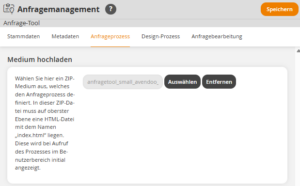
Enter a title and, in the Request Process → Select area, select the previously uploaded ZIP file. Click Save.
4
Navigate to User Management → Clients and select the activation client. The client wizard opens.
5
Go to the Options area and, in the Request Tool area, specify the previously created request tool. A request tool can be assigned per role.
6
Click on Save.
As soon as the request tool has been specified, users with the corresponding role and the required permissions can create training suggestions.
Prerequisite:
- Author account with the Administration (objects) right: Select, modify, create request management.
- A request tool that interacts with the Avendoo API and is packaged as a ZIP file.