


Print From the Event Manager
With this function, you can quickly and easily create and print personalized documents – such as name tags for your next Seminar.
1
Go to Event management → Overview of event date or Overview by event date group and click the Event title to open the Event Manager for a date.
2
On the Overview tab, select the Print option.
3
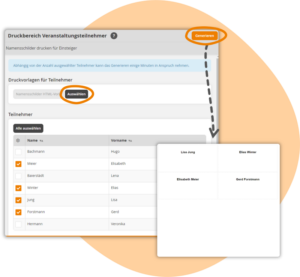
A dialog window opens. Select a print template here that you have previously created as an individual page.
4
Then select the participants whose data should be transferred to the print template. The template is then adapted accordingly for each Selected user and converted into a printable document. If you Use template in Word format, a Word File is created for printing. When using HTML, the Results open in a new window, where they can be printed using the browser’s print function.
Prerequisites
Author account with Access to an Activation client and the following author rights:
- Access to the event manager
- All or Own event dates: Show event dates
- Available Print Template