


Cancel registration of all participants of an event date
With the function Cancel registration of all participants, you can cancel the registration of all participants of an event on the main event date at the same time. You can specify a reason for canceling registration and additional remarks. Subsequently, the deregistration notifications are sent automatically if these have been activated for the event.
1
Go to Event management → Overview of event date or Overview by event date group and click the Event title to open the Event Manager for a date.
2
On the Overview tab, select the option Cancel registration of all participants.
3
The Deregistration from event date dialog box opens. Select a reason for canceling registration and, if required, add a remark that can be displayed in the confirmation of registration cancelation.
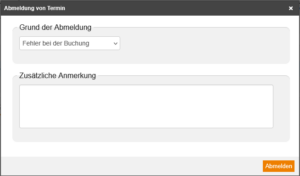
4
Click on Cancel registration.
The confirmations of registration cancelation are sent automatically for the main event date and the subsequent dates, provided they have been activated for the Event under Notifications → Event – manual deregistration. If you had activated the option Send e-mail of event date group in the event date wizard under Parameters, only one deregistration e-mail is sent.
Prerequisites
Author account with access to an activation client and the following author permissions:
- Access to the Event Manager
- All or Own event dates: Show event dates
- All or Own event dates: Do deregistrations and registrations