


Exchange graphic elements for the horizontal learning path
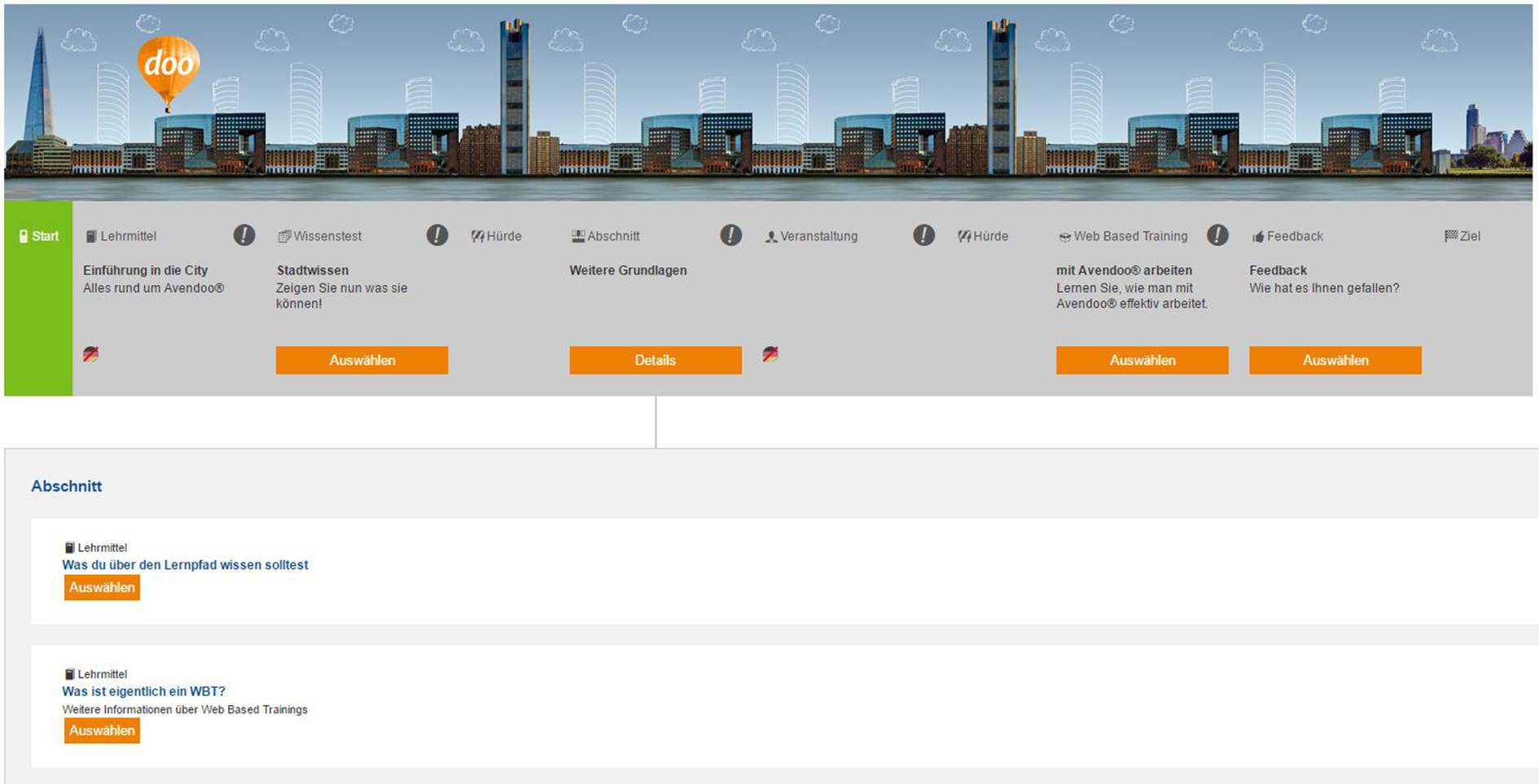
The design of the horizontal learning path can be individually customized in Avendoo. As an example, we have illustrated the entire learning path as well as the various statuses and options in the City theme here. Contact us if you would like us to take on these tasks.
How to exchange the Graphics for the Learning path in your learning world:
1
Download the Learning path graphic elements as a ZIP folder.
2
For each graphic, create a corresponding image in your desired visual language. Ensure that the file names are not changed and that the graphics can be displayed cohesively (overall view consistent and uniform height).
3
In the backend, navigate to Administration → Media for use everywhere and search for the Medium 16_Lernpfad_Unterwasser_V5_SCSS.zip.
4
Replace the Medium for use everywhere with a Zip folder containing your own graphics.
5
Save the Medium for use everywhere. Your individual design is now available in all horizontal learning paths.
Overview and Explanation of the Learning path Graphic Elements
Below you will see a Preview of the graphics and can understand when each graphic is displayed. When creating the graphics, all graphics should have the same Height (e.g., 190 pixels). You can vary the Width.
Start
The Start image indicates the Beginning of the Course. An example Image size is 66 x 190 pixels.

{%CAPTION%}
Goal
The Goal image concludes the Learning path. If a Course has not yet been Completed, the first image goal_normal.jpg is displayed. If a Course has been Completed, the second graphic is displayed.

goal_normal.jpg

goal_position.jpg
Hurdle
Learning objects behind the Hurdle can only be Selected after processing the mandatory objects before the hurdle. You can store an Image for the Hurdle, for example, with a Size of 97 x 190 pixels.

{%CAPTION%}
Sections
The Section object combines a learning path with learning objects and control elements. In all learning paths, you can also close an expanded section again.
Section not begun, i.e., no element has been looked at

section_normal.jpg
Section can be started

section_position.jpg
Section completed, i.e., all elements are completed

{%CAPTION%}
Learning objects
All regular learning objects on the learning path can also be provided with graphics. For example, these include Instructional material, knowledge tests, etc.
Object not begun
object_normal.jpg
Object can be started
object_position.jpg
Object completed
object_completed.jpg
Blocked learning objects
The Object is blocked by the author and is currently being processed.
Object not begun and blocked

barrier_closed.jpg
Object to be started blocked

barrier_position_closed.jpg
Object completed and blocked

barrier_completed_closed.jpg
Checkpoints
The learning objects behind the checkpoint are only achieved if the participant has achieved a specific certification. A checkpoint checks whether a certification (e.g., from a predecessor course) has been obtained in Avendoo. Even if the condition is not met, it is possible to register for events located behind the checkpoint.
Checkpoint is
imminent and the certificate is already available

controllpoint_open.jpg
Checkpoint is imminent and the certificate is not yet available

controllpoint_closed.jpg
Checkpoint has been achieved, but the certificate is not available

controllpoint_position_closed.jpg
Checkpoint has been achieved and the certificate is already available

controllpoint_completed_open.jpg
Task hurdles
The Learning objects behind the task hurdles are only achieved when the Participant has completed a specific Task.
Task hurdles are
imminent and the tasks have already been completed

task_open.jpg
Task hurdles are imminent and the tasks still need to be started

task_closed.jpg
Task hurdles have been achieved and tasks still need to be started

task_position_closed.jpg
Task hurdles have been passed and tasks have been completed

task_completed_open.jpg
Time obstacle
The Learning objects behind the time obstacle are only achieved when a specific key dates and times is achieved. Avendoo proceeds from one of the following four points of departure: Activation of the course activation, end time for course activation, registration as course participant or start date for the run.
Time obstacle is imminent and has already passed
time_task_open.jpg
Time obstacle is imminent and has not yet passed
time_task_closed.jpg
Time obstacle has been achieved, but has not yet passed
time_task_position_closed.jpg
Time obstacle has been passed
time_task_completed_open.jpg
Prerequisites
Author account with the permission Media for use everywhere: Change, Create.