


Delete authors
If you want to remove an author from the system, their content must first be transferred to another author. This ensures that existing content remains available and editable. The following step-by-step guide shows you how to proceed.
1
Navigate to User management. Check the box next to the author you wish to delete. Then, in the drop-down menu below the list view, select the Delete option and click Apply. A dialog window will open.
2
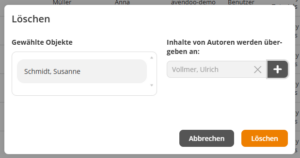
To be able to delete the author, you must transfer their content to another author. To do this, click on the plus icon. In the search mask that opens, select the desired author and confirm your selection with Select.
3
Then click Delete to complete the process.
Prerequisites
Author account with the permission User management (objects): Delete author
Was this article helpful?
Thank you for your feedback!