


User Profiles
Under User Profiles in Avendoo’s User management, authors can control which fields in the user’s personal data can be viewed and edited. Learn how to create a default user profile here.
1
Go to User management → User Profiles and click Create. The user profile wizard opens.
2
Assign a meaningful Title.
3
In the Parameters tab, you define which user details can be visible, editable, displayed in the attendee list, or changed by the team leader.
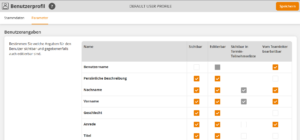
The user details selected with the checkbox Visible in Event date attendee list will be displayed in the attendee list on the Event date detail page, according to the corresponding settings for the event.
The user details selected with the checkbox Editable by team leader allow team leaders who have the Edit user team leader right to edit user data in the employee table in the cockpit.
4
Save.
Prerequisites
- Author account with the permission User profile: Change, create.
- The new user profile must be activated for the client so that it can be selected by the user.
Was this article helpful?
Thank you for your feedback!