


Publish news
To inform users about news in your learning environment, you can publish news in Avendoo. This will appear in the user area on the homepage. We will show you how to publish the news in this article.
1
Go to User management → Clients.
2
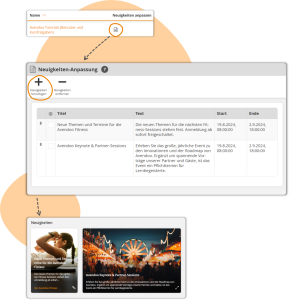
In the client overview, click the News icon. The icon only appears for tenants for course releases and users.
3
Select the Add news items option to publish created news. The news must have been created beforehand under Resources.
4
Done. The news item is now visible to the client’s users during the specified period.
You can remove news items from a client by selecting one or more news items in the overview and then clicking Remove news item.
Prerequisite
Author account with the permission Resources (objects): Change, create news and the permission to User management (objects): Change, create tenants.
Was this article helpful?
Thank you for your feedback!