


Creating roles
A role in Avendoo describes a function or additional function that a person assumes within the organization. Examples of roles include developers, designers, or data protection officers. Contrary to that, the umbrella term for authors or users in Avendoo is user types.
Roles support central processes in Avendoo. They play a significant role in assessments, feedback, qualification profiles, and user import. In addition, they enable the author to define targeted participant rules based on specific roles. Roles are also displayed in various reports.
Learn here how to create a role on the client. Subsequently, the role can be assigned to the respective user in the Author wizard or User wizard directly or via the permission group.
1
In the backend, go to User management → Clients.
2
Click on the name of the client in which you want to create the roles. It should be the client where your users are located. The client wizard will open.
3
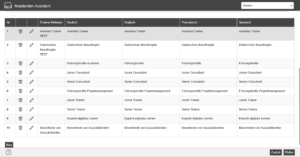
Go to the Roles tab. In the Roles section, click the New button and assign a name to the role (‘value’) in the languages you use.
4
Click Apply. The role is now created and appears in the list. You can edit it later by clicking on the pen.
Now you can assign the role to a user group or a user, or link it to a qualification profile, for example.
Prerequisites:
- Author account with the permission User administration (objects): Change, create clients.
Was this article helpful?
Thank you for your feedback!