


Registration process
With the registration function in Avendoo, you can independently create a user account for the learning world. This guide describes the registration process step by step.
1
Call up the URL for your learning world and select the Register option.
It is possible that you received a direct link for registration (e.g., https://academy.avendoo.de/ui/index?register=true).
2
Enter a Verification code (e.g., doo347-125) that you received from a Contact partner for the learning world.
Entering the registration code ensures that only Users who are authorized can access the System. It is possible that you received a direct link including a Verification code from your Contact partner (e.g., https://academy.avendoo.de/ui/index?register=true&code=doo347-125)
3
Fill in the fields of the Registration Form.
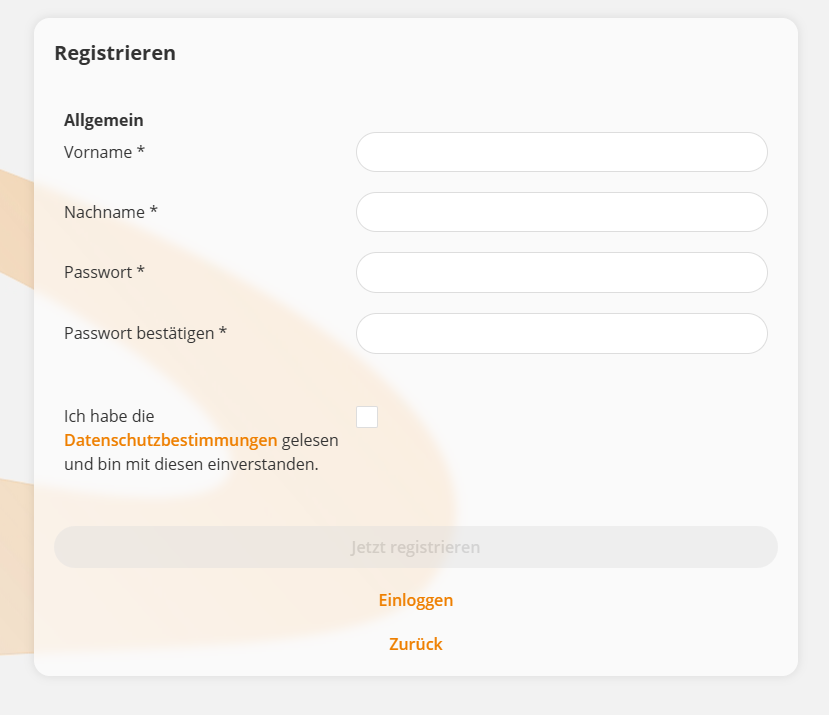
The information contained in the Form was determined by an Author and may differ in your case from the illustration. Mandatory information is always First name, Last name, and Password.
4
Confirm your details by clicking the Register now Button. A confirmation dialog with the next steps will be displayed.
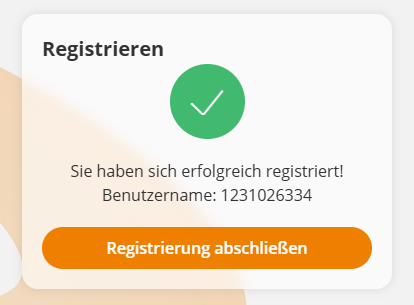
By clicking Close registration, you will be logged directly into your new User account.
If the Author has activated Double Opt‑In, you must provide your E-mail address during registration and Confirm it After submitting the Form. You will Receive an E-mail with a confirmation link. After successful confirmation, you can log in with your access data.
Double Opt-In is a security mechanism that verifies whether the specified E-mail address actually belongs to the User.
Prereqisites
- Registration is activated in the System settings
loginArea.register.activefor your learning world. - You know a Valid Registration code for Verification