


Number of Attempts for a Knowledge Test
Once you have added a knowledge test to a course, you can define how many attempts are available for the knowledge test. This guide shows you how to do this.
1
Navigate to Learning Content → Courses, open the desired course, and switch to the Course Content tab. Add a knowledge test.
2
Click the edit icon to the right of the knowledge test. The general properties of the knowledge test will open.
3
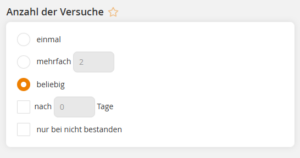
Scroll down to the Number of Attempts section. Here you can define whether the knowledge test may be taken only once, multiple times, or an unlimited number of times.
You can also specify after how many days a retake is allowed or whether a new attempt should only be permitted if the test was not passed.
4
Save your settings.
For a knowledge test with the option “only if not passed”, a retake is only possible once all included free-text questions have been assessed.
Prerequisite
Author account with the following permissions:
– Courses: edit, create
– Learning content: select knowledge tests