


My active substitutions
Under My active substitions, you can access a team leader cockpit that has been assigned to you as part of a delegation.
If a team leader is absent, they can appoint one or more substitutes. These substitutes can access the team leader cockpit of the person they are representing via My active substitutions..
There, they have the same rights and options for a limited period of time that the team leader themselves has for managing their team. Learn here how to get to the delegation cockpit.
1
Click on Your profile picture and select My active substitutions in the drop-down menu.
2
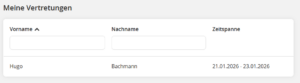
The overview of your current substitutions opens.
3
Click on the name of the team leader you are representing. The representation view opens, indicated by the small pop-up in the lower center of the window.
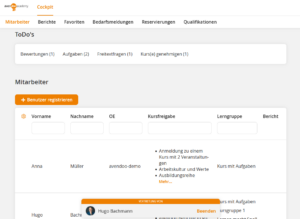
Here you can now manage the team as a representative and have all the rights and options that the represented team leader has. Find out more about the cockpit here:
To the cockpit
Prerequisites:
- A team leader has added you as a substitute.
Was this article helpful?
Thank you for your feedback!