


Set up plugin for additional functions
This guide will show you how to set up a plugin in Avendoo.
1
Navigate to Administration → Plugins and click Create.
2
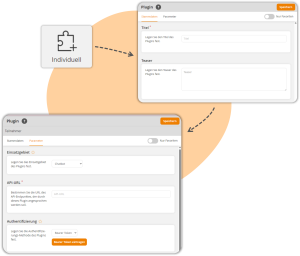
A new window will open, where you can choose whether you want to add a individual plugin, OpenAI, or Microsoft OpenAI.
3
In the Master Data section, define a title and optionally a teaser for the plugin.
4
Under Parameter, define the plugin’s area of application (e.g., translation or chatbot). For plugins of the Individual and Microsoft OpenAI type, also enter an API URL.
5
Then, define the authentication method and verify access using an API key. For OpenAI type plugins, HTTP Basic or a Bearer Token can be used as alternative authentication.
If you do not know the access data for the service used, please ask your IT administrator.
6
Save.
Prerequisite
An author account with the permission: Administration (Objects): Change, create plugins.