


Evaluate an essay question
If you, as an author, see an essay question to be evaluated in the backend, this guide explains the further procedure.
1
Go to Course Management → Assessments of essays. There you will find a list of all essay questions that still need to be evaluated.
2
Click on the Evaluate icon to start evaluating an essay question.
3
- Left side: Here you will see general information about the question and the learner.
- Right side: Here the question is displayed, followed by the learner’s answer.
Check the question and the examinee’s answer. Then write an evaluation in the Evaluation text field and assign a score. The evaluation notes can serve as a guide.
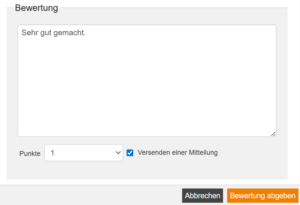
4
Click on the Submit assesment button to complete the evaluation.
Lorem ipsum dolor sit amet, consetetur sadipscing elitr, sed diam nonumy eirmod tempor invidunt ut labore et dolore magna aliquyam erat, sed diam voluptua. At vero eos et accusam et justo duo dolores et ea rebum. Stet clita kasd gubergren, no sea takimata sanctus est Lorem ipsum dolor sit amet. Lorem ipsum dolor sit amet, consetetur sadipscing elitr, sed diam nonumy eirmod tempor invidunt ut labore et dolore magna aliquyam erat, sed diam voluptua. At vero eos et accusam et justo duo dolores et ea rebum. Stet clita kasd gubergren, no sea takimata sanctus est Lorem ipsum dolor sit amet.
Lorem ipsum dolor sit amet, consetetur sadipscing elitr, sed diam nonumy eirmod tempor invidunt ut labore et dolore magna aliquyam erat, sed diam voluptua.