


Create author (Starter)
If you want to create authors in Avendoo, you will learn the necessary steps in this guide. In contrast to the user, the author takes on the role of content creator or administrator in the learning world. Depending on their permissions, they can also take on administrative or support tasks.
1
Navigate to User management > Users and then click on the Create author button. The author wizard opens to enter the user data.
2
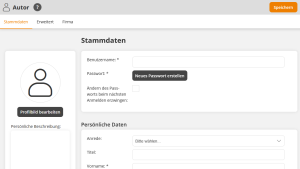
Under master data, first select the client in which you would like to create the author and then fill in the required fields: User name, first name, surname and e-mail address. Finally, generate a secure password for the author.
3
Under the menu item Company, enter the author’s organizational unit.
4
Save.
Prerequisite
Author account with the permission User: Change, Create
Was this article helpful?
Thank you for your feedback!